
“Sed ut perspiciatis unde omnis iste natus error sit voluptatem accusantium doloremque laudantium, totam rem aperiam, eaque ipsa quae ab illo inventore veritatis et quasi architecto beatae vitae dicta sunt explicabo. Nemo enim ipsam voluptatem quia voluptas sit aspernatur aut odit aut fugit, sed quia consequuntur magni dolores eos qui ratione voluptatem sequi nesciunt. Neque porro quisquam est, qui dolorem ipsum quia dolor sit amet, consectetur, adipisci velit, sed quia non numquam eius modi tempora incidunt ut labore et dolore magnam aliquam quaerat voluptatem. Ut enim ad minima veniam, quis nostrum exercitationem ullam corporis suscipit laboriosam, nisi ut aliquid ex ea commodi consequatur? Quis autem vel eum iure reprehenderit qui in ea voluptate velit esse quam nihil molestiae consequatur, vel illum qui dolorem eum fugiat quo voluptas nulla pariatur?”
“But I must explain to you how all this mistaken idea of denouncing pleasure and praising pain was born and I will give you a complete account of the system, and expound the actual teachings of the great explorer of the truth, the master-builder of human happiness. No one rejects, dislikes, or avoids pleasure itself, because it is pleasure, but because those who do not know how to pursue pleasure rationally encounter consequences that are extremely painful. Nor again is there anyone who loves or pursues or desires to obtain pain of itself, because it is pain, but because occasionally circumstances occur in which toil and pain can procure him some great pleasure. To take a trivial example, which of us ever undertakes laborious physical exercise, except to obtain some advantage from it? But who has any right to find fault with a man who chooses to enjoy a pleasure that has no annoying consequences, or one who avoids a pain that produces no resultant pleasure?”
Contrary to popular belief, Lorem Ipsum is not simply random text. It has roots in a piece of classical Latin literature from 45 BC, making it over 2000 years old. Richard McClintock, a Latin professor at Hampden-Sydney College in Virginia, looked up one of the more obscure Latin words, consectetur, from a Lorem Ipsum passage, and going through the cites of the word in classical literature, discovered the undoubtable source. Lorem Ipsum comes from sections 1.10.32 and 1.10.33 of “de Finibus Bonorum et Malorum” (The Extremes of Good and Evil) by Cicero, written in 45 BC. This book is a treatise on the theory of ethics, very popular during the Renaissance. The first line of Lorem Ipsum, “Lorem ipsum dolor sit amet..”, comes from a line in section 1.10.32.
Booking guideline
The eSIM must be activated within 60 day(s) after you purchase the eSIM. It is strongly recommended to activate your SIM card as soon as at the departure airport (on the day that your departure) to avoid any instances of failed activation
Dial “*#06#” on your mobile phone. If the EID barcode appears, it means your mobile phone supports the eSIM function. Alternatively, follow the this guideline to check the settings.
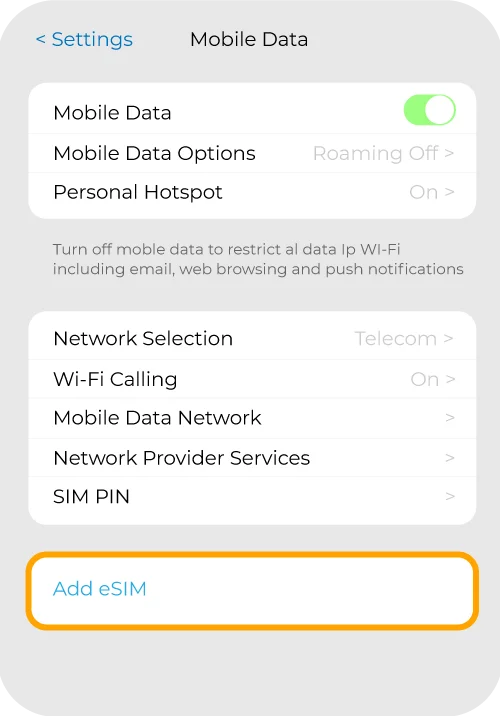
Step 1
Go to Settings > Mobile Data > Add Data Plan/Add eSIM
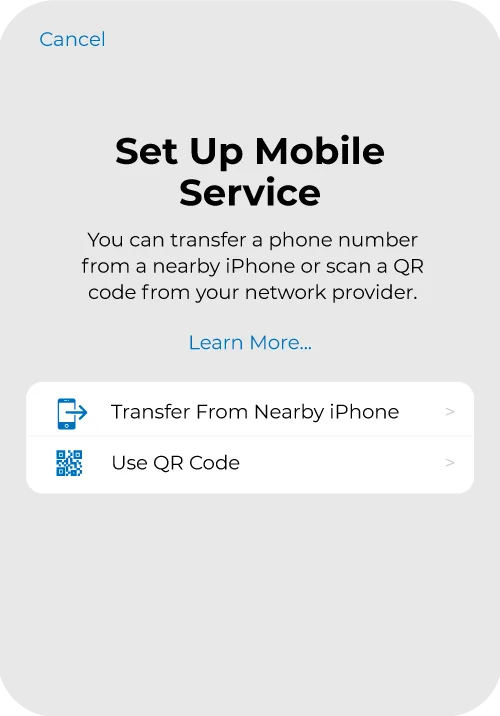
Step 2
Scan the QR code that you have received from the email
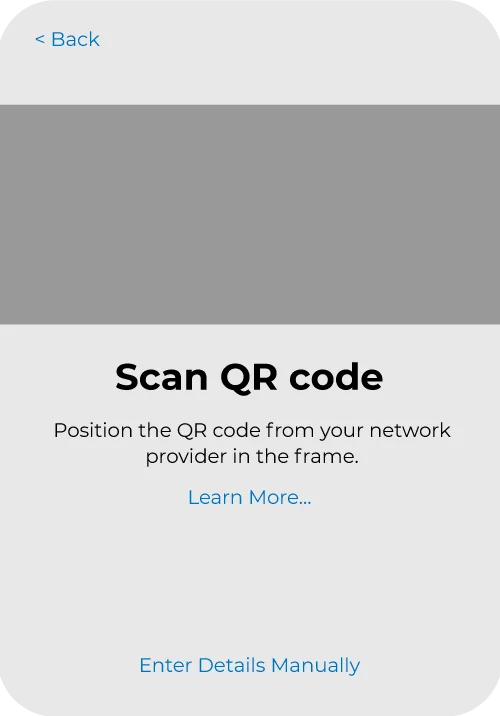
Step 3
Your eSIM has been installed, turn on the mobile data and roaming data when you arrive at the country.
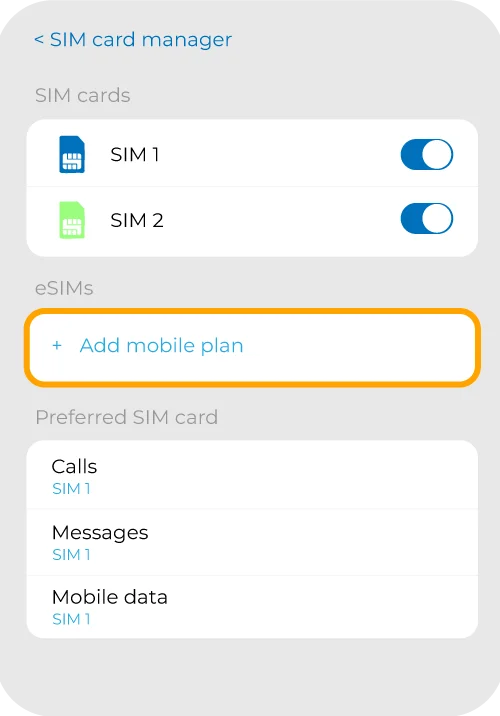
Step 1
Go to Settings > Connections > SIM card Manager > Tap on “Add Mobile Plan” or “Add eSIM”
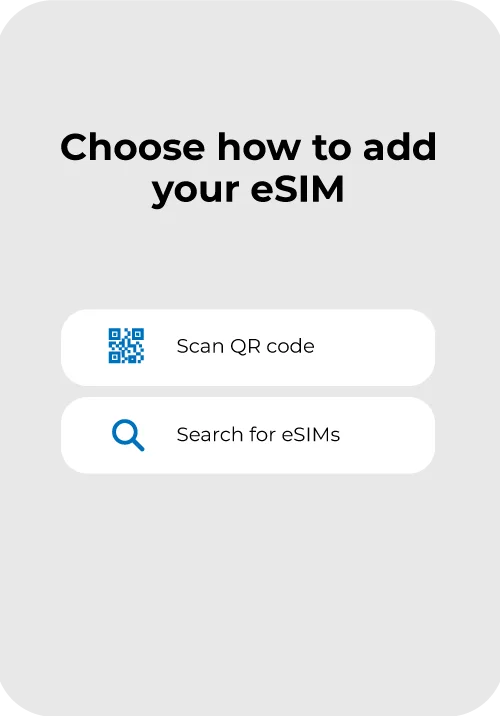
Step 2
Choose to add the eSIM using QR code.
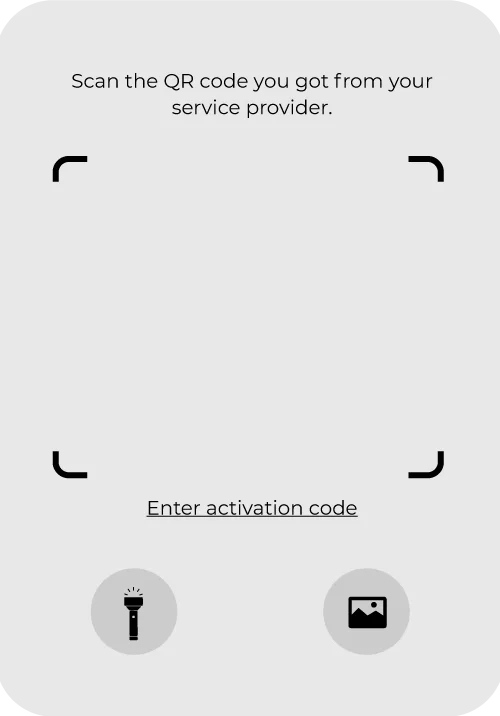
Step 3
Your eSIM has been installed, turn on the mobile data and roaming data when you arrive at the country.

Check that your device is eSIM compatible

Select your destination and your preferred plan

Receive an email that consist of the QR code

Follow the instructions to install the eSIM to your device

Turn on your eSIM when you arrive at your destination
Frequently asked questions
about eSIMsYes, an eSIM will work on these devices if they support the eSIM functionality. Not sure? See our list of eSIM-supported devices.
If you are still unsure or your device model is not listed in the list, please click here to learn about how to check if your device compatible with eSIM.
Our Unlimited Data plans are designed to give you worry-free internet while you travel. To ensure that all customers enjoy a smooth experience, we apply a Fair Usage Policy (FUP). We offer 1GB high speed internet data daily, followed by unlimited data at reduced speed up to 256kbps. Refresh daily at 12am (Malaysia time).
If your eSIM is not working, you can try a few things to get it back on track:
You can find the QR code from the booking details that you received via email or you can login to your account to view the QR code.
You can scan the QR code with a device that is eSIM compatible by following these steps:
iOS
Android
Network & Internet > SIMs > Add Cellular Plan
Check if your device is locked to a carrier, as eSIMs can’t be activated on locked devices. Please contact your carrier for more information.
No. You can use the eSIM only on one device. As such, one QR code can’t be used multiple times or on multiple devices. Make sure to scan the QR code and activate the eSIM on the device you intend to use it on.
Yes. Make sure to turn on data roaming after you arrive at your destination. You can toggle it on from the eSIM settings.
It is recommended to install and activate the eSIM at the departure airport. This is to ensure you have a seamless connection right after you reach at your destination.